

For many, typing is a way of life now, whether it’s for work, school, or personal projects. But long hours on a laptop or computer can sometimes cause discomfort in the wrist and hands.
Wrist pain from typing is becoming increasingly common among people who spend long hours working on laptops, computers, or using a mouse continuously. In many cases, the discomfort may improve with rest, but persistent tingling, numbness, or weakness can sometimes point toward conditions such as carpal tunnel syndrome.
It is important to know the difference between temporary strain and any potential carpal tunnel symptoms in the wrist area so you can take appropriate action to gain comfort and care.
The typing operation requires repeated use of the fingers and hands during the day. These repetitive movements over time may cause stress on the muscles and tendons surrounding the wrist as well as the nerves.
The purpose of the study was to gain insight into the prevalence of wrist and hand pain in frequent laptop users. An occupational health study published in International Journal of Current Science (IJCSPUB) reported wrist pain symptoms in more than half of surveyed computer users, and 41% indicated that they had hand pain, indicating the increasing prevalence of upper-limb strain with prolonged laptop use.
Luckily, for many people, having wrist pain from typing can improve with simple changes to their posture, work habits, and support. Learning about why this discomfort happens is the first step to feeling better.
Repetitive typing and mouse use can cause repetitive stress on the wrist joint and surrounding tissues. If the same exercises are repeated for extended periods without a break, the muscles and tendons can become strained.
Repetitive strain caused by prolonged typing and continuous mouse use is one of the most common reasons for wrist pain during computer work. Symptoms often develop gradually and may become more noticeable after extended typing sessions or long hours of computer use. Over time, this repetitive strain can be reduced by taking regular breaks and gently stretching out the hands. Early evaluation and ergonomic guidance from experts at one of the best orthopedic hospitals in Chennai can help prevent repetitive strain from affecting long-term wrist and hand function.
The way your wrists are positioned while typing can also affect comfort. Prolonged extension of the wrists up or down can compress nerves and adjacent tissues.
Working for long periods without proper wrist support or ergonomic positioning can place additional strain on the wrists and surrounding nerves. This can cause stiffness, tingling or discomfort in the hands and fingers over time. Maintaining the wrists in a relaxed and neutral position may help reduce strain during typing and repetitive hand movements.
If you continue working without rest, it can aggravate stress on the wrists and fingers. Many people continue working for hours without resting their hands, which can lead to muscle fatigue.
Allowing short breaks between typing sessions helps the hands and wrists to rest. Simple stretching exercises, hand movements, or short movement breaks may help reduce wrist pain from typing and improve circulation during prolonged computer work.
The way you position your workstation makes a difference in keeping your wrists comfortable. The height of the desk or chair can also make typing difficult, as it may cause the wrists to be in an unnatural position.
Wrist pain from typing and mouse can also result from improper screen height, unsupported elbows and uncomfortable seating. An ergonomically adjusted workstation may help reduce strain on the wrists, shoulders, and upper limbs during prolonged computer use.
A lot of people ask if their discomfort is just strain or maybe something more specific, such as carpal tunnel syndrome.
According to Informatics Journals, the study found that around 31% of bank employees in Kolhapur city who regularly used computers experienced symptoms related to this condition. Carpal tunnel syndrome occurs when there is increased pressure on the median nerve in the wrist. Mild wrist strain often improves with rest, whereas carpal tunnel symptoms may gradually worsen if pressure on the median nerve continues over time.
|
Symptom |
Wrist Strain |
Carpal Tunnel |
|
Pain type |
Mild aching after activity – discomfort usually appears after long typing or mouse use and improves with rest. | Tingling or burning sensation – pain may spread to the fingers and feel more noticeable during repetitive hand movements. |
|
Numbness |
Usually absent – most people experience soreness without numbness in the fingers or hand. | Common in fingers – numbness is often felt in the thumb, index, or middle fingers. |
| Tingling | Rare – occasional mild tingling may happen after strain but usually settles quickly. |
Often present – tingling may continue during typing, holding objects, or even while resting. |
|
Timing of pain |
Mostly after long typing sessions – discomfort is commonly linked to extended computer use. |
May occur even at night – symptoms can continue beyond work hours and sometimes disturb sleep. |
| Grip weakness | Mild – hand strength may feel slightly tired after repetitive activity. |
More noticeable – holding objects, typing, or gripping items may feel difficult over time. |
If you know the difference early on, you can ensure you take better care of your wrist health. When every moment counts, having access to the right medical care at the right time from a trusted hospital with 24/7 emergency services in Chennai can make all the difference.
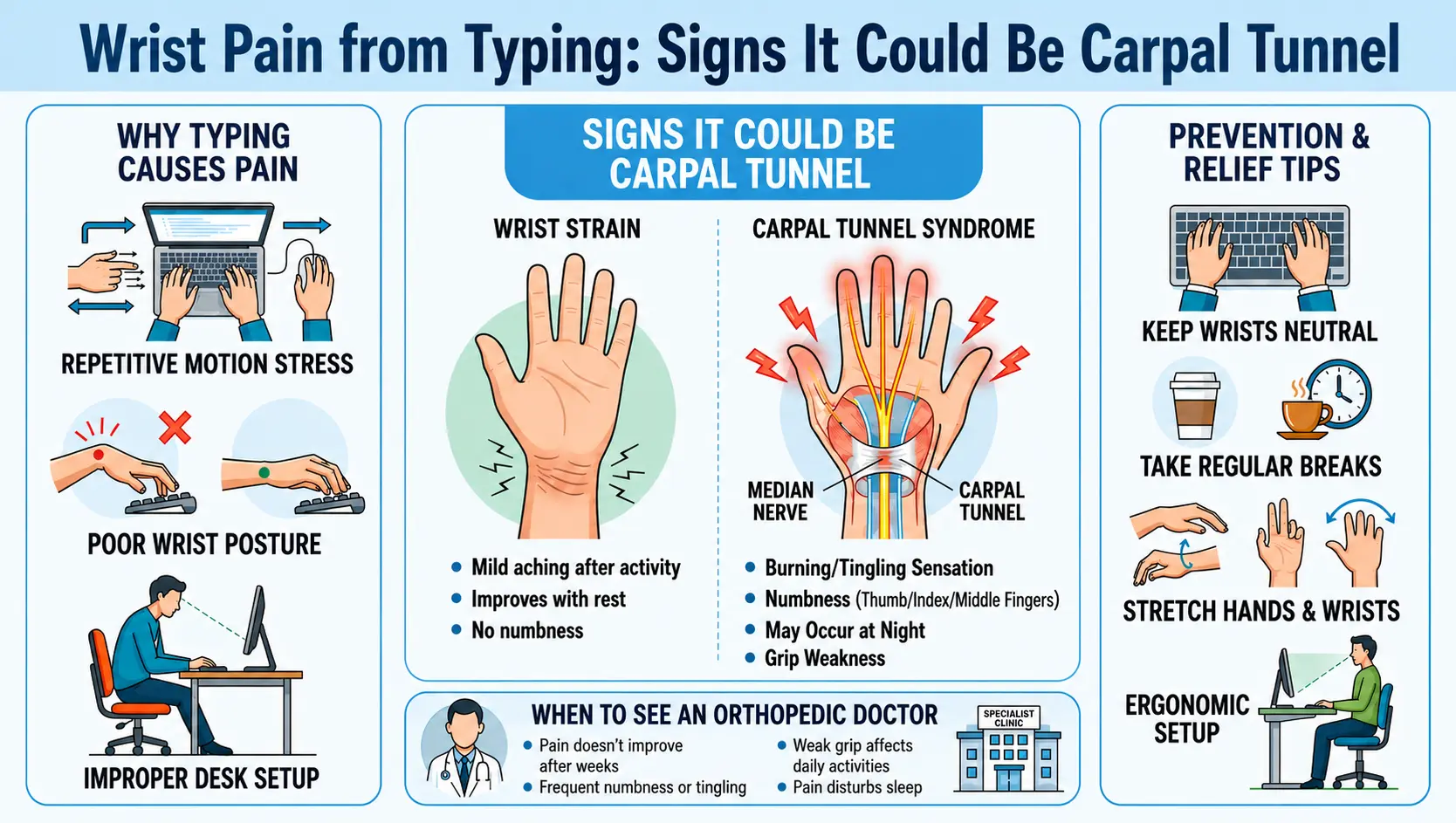
If you see some of these early symptoms of carpal tunnel syndrome, it might be time to take wrist pain more seriously.
Common symptoms are:
If early signs of carpal tunnel syndrome such as tingling, numbness, or grip weakness continue frequently, medical evaluation may help identify the underlying cause earlier. Early treatment at a trusted rehabilitation and therapy centre in Chennai can lead to better recovery results, restore motion, and ensure that the recovery process is both confident and full of confidence.
Sometimes simple changes in your routine can make a big difference to comfort.
These are some simple tips that may be useful for treating mild wrist pain from typing.
Some symptoms may require medical attention, although the discomfort in the wrist may improve with rest and ergonomic adjustments.
If your wrist pain doesn’t improve even after a few weeks, it’s a good idea to get it checked by an orthopedic doctor. Frequent tingling, numbness, or a weaker grip can sometimes make simple activities feel difficult. You may also notice discomfort while holding everyday items or typing for longer periods. If the pain begins to disturb your sleep or affect your normal routine, early medical evaluation may help prevent symptoms from progressing and support better long-term wrist function.
An orthopaedic specialist can examine the condition appropriately and recommend supportive treatment according to your symptoms.
One of the easiest ways to reduce wrist discomfort while working on a computer is by making a few small changes to your daily setup and posture. Keeping your screen at eye level and sitting with relaxed shoulders can help reduce unnecessary strain on the neck, arms, and wrists.
Supporting your forearms while typing and keeping your wrists in a comfortable, straight position may also improve comfort during long work hours. It also helps to type with light hand pressure instead of pressing the keys too hard. Along with this, staying physically active throughout the day and taking short movement breaks can support better circulation and overall wrist health.
Consistent ergonomic habits, regular movement breaks, and proper posture may help reduce long-term wrist strain associated with computer work.
Wrist pain from prolonged typing and computer use has become increasingly common in both workplace and home environments. Correct posture, frequent breaks, and small changes in working habits can often alleviate discomfort in many cases.
However, persistent tingling, numbness, weakness, or discomfort affecting the fingers and wrists may sometimes indicate carpal tunnel syndrome or nerve-related strain that requires medical attention.
Fortunately, symptoms can be effectively controlled and long-term comfort maintained with early awareness and appropriate care. Consult our physicians now to make an appointment.
Absolutely, over time, repetitive typing movements can put strain on the muscles and tendons of the wrist.
2. What symptoms can appear in the early stages of carpal tunnel syndrome?
Early symptoms include tingling, numbness and weakness in the fingers.
3. Is wrist pain from typing temporary?
In most cases, mild strains improve with rest and correction of posture.
4. Can poor posture affect the wrist?
Yes, the awkward wrist position can add pressure on nerves and muscles.
5. How often should I take typing breaks?
Take breaks every 30-60 minutes to avoid hand and wrist strain.
6. Can laptop use increase wrist discomfort?
Proper wrist support should be used when the laptop is being used in order to prevent discomfort.
7. Is stretching helpful for wrist pain?
Gentle wrist and finger stretching exercises may help improve flexibility and reduce stiffness associated with repetitive strain.
8. When should I consult an orthopedic doctor?
If the problem does not improve or gets worse, or begins to interfere with your daily life, it’s better to seek medical advice.
9. Can carpal tunnel symptoms affect sleep?
Some may experience some tingling or discomfort in their hands at night.
10. How can I prevent wrist pain while working?
Good posture, rest breaks and the use of ergonomic support can help to avoid discomfort.
11. Can typing every day lead to carpal tunnel syndrome?
Repeated typing and prolonged wrist strain may contribute to pressure around the median nerve over time, especially when combined with poor posture or inadequate ergonomic support.
12. Which fingers are commonly affected in carpal tunnel syndrome?
Carpal tunnel syndrome most commonly affects the thumb, index finger, middle finger, and part of the ring finger due to compression of the median nerve.